Hive Plots Using Other Visualization Libraries#
This notebook first demonstrates how to visualize hive plots with holoviews, plotly, and bokeh through formal hiveplotlib support.
We then show how to create a baseline JSON output from a toy HivePlot instance.
Next, we use this JSON output to visualize the same toy example in JavaScript using the <hive-plot> Web Component from our sister npm package [@hiveplotlib/d3](https://www.npmjs.com/package/@hiveplotlib/d3).
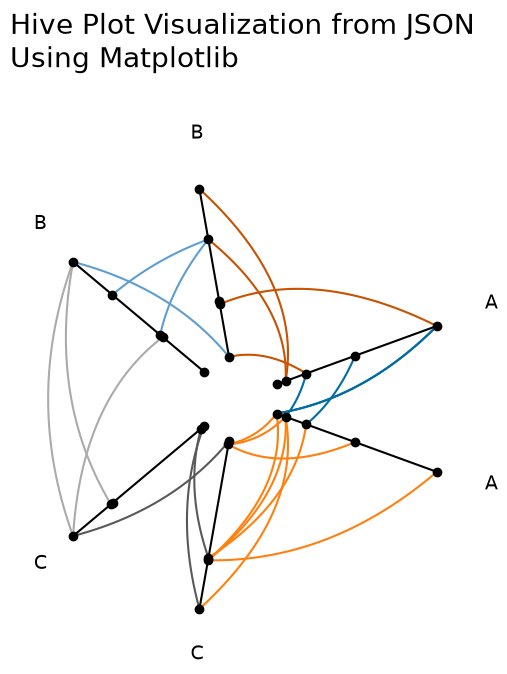
Finally, we demonstrate how to visualize this toy hive plot in pure matplotlib. Although hiveplotlib of course supports matplotlib visualizations formally, this last example is meant to demonstrate wrangling the JSON data product to help users who need to translate the JSON output to an unsupported Python visualization library.
For the full reference of the JSON output structure (the contents under "axes", "edges", and "node_viz_kwargs"), see the Exporting Hive Plots to JSON gallery page.
Matplotlib Baseline#
We will use the following example throughout this notebook.
[1]:
import matplotlib.pyplot as plt
from hiveplotlib.datasets import example_hive_plot
[2]:
hp = example_hive_plot(
num_nodes=15,
num_edges=25,
repeat_axes=True,
seed=3,
)
# add some color customization
color_dict = {
"A": {"A": "#006BA4", "C": "#FF800E"},
"C": {"B": "#ABABAB", "C": "#595959"},
"B": {"B": "#5F9ED1", "A": "#C85200"},
}
for p1 in color_dict:
for p2 in color_dict[p1]:
hp.update_edges(
partition_id_1=p1,
partition_id_2=p2,
color=color_dict[p1][p2],
)
fig, ax = hp.plot(
figsize=(6, 6),
axes_kwargs={"color": "black", "alpha": 1.0},
alpha=1,
)
ax.set_title("Hiveplotlib Starting Point", y=1.2, fontsize=20)
plt.show()
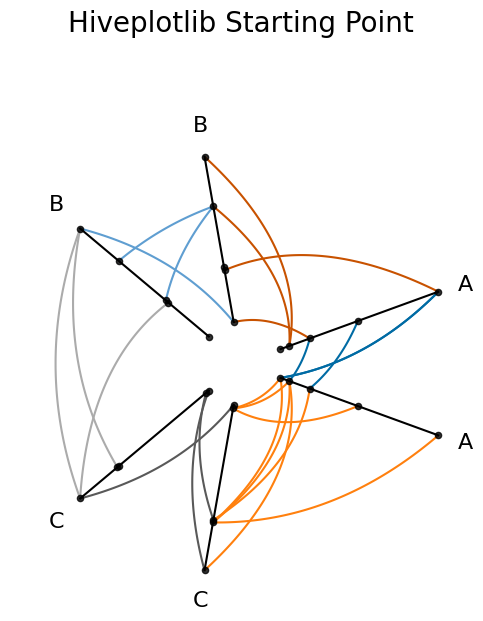
For more on the nuances of using the "matplotlib" viz back end, see the Hive Plots in Matplotlib page.
holoviews#
hiveplotlib supports visualizations with a holoviews back end. We need only set the viz back end accordingly.
Note: the holoviews-based viz back ends require that hiveplotlib be installed with extra packages, which can be done by running:
pip install hiveplotlib[holoviews]
hiveplotlib supports holoviews plotting using both bokeh ("holoviews-bokeh") and matplotlib ("holoviews-matplotlib").
Holoviews (Bokeh Back End)#
[3]:
hp.set_viz_backend("holoviews-bokeh")
# note the extra plotting kwargs changed to holoviews-bokeh ones, not mpl
fig = hp.plot(
node_kwargs={"size": 7},
axes_kwargs={"line_alpha": 1, "line_width": 2},
line_width=2,
line_alpha=1,
)
fig = fig.opts(
title="Hiveplotlib (Holoviews-Bokeh Back End)",
fontsize={"title": 20},
)
fig

 ⓘ
ⓘ
[3]:
Note that switching to this interactive back end gave us hover information over our nodes, edges, and axes.
For more on the nuances of using the "holoviews-bokeh" viz back end, see the Hive Plots in Holoviews-Bokeh page.
Holoviews (Matplotlib Back End)#
[4]:
hp.set_viz_backend("holoviews-matplotlib")
# note the extra plotting kwargs changed to holoviews-matplotlib ones
fig = hp.plot(
node_kwargs={"s": 50},
axes_kwargs={"alpha": 1, "linewidth": 2},
linewidth=2,
alpha=1,
)
fig = fig.opts(
title="Hiveplotlib (Holoviews-Matplotlib Back End)",
fontsize={"title": 30},
)
fig
 ⓘ
ⓘ
[4]:

For more on the nuances of using the "holoviews-matplotlib" viz back end, see the Hive Plots in Holoviews-Matplotlib page.
bokeh#
hiveplotlib supports visualizations with a bokeh back end. We need only set the viz back end accordingly.
Note: the "bokeh" viz back end requires that hiveplotlib be installed with extra packages, which can be done by running:
pip install hiveplotlib[bokeh]
[5]:
from bokeh.io import output_notebook
from bokeh.plotting import show
output_notebook()
[6]:
hp.set_viz_backend("bokeh")
# note the extra plotting kwargs changed to bokeh ones
fig = hp.plot(
node_kwargs={"size": 7},
axes_kwargs={"line_alpha": 1, "line_width": 2},
line_width=2,
line_alpha=1,
)
fig.title = "Hiveplotlib (Bokeh Back End)"
fig.title.text_font_size = "30px"
show(fig)
For more on the nuances of using the "bokeh" viz back end, see the Hive Plots in Bokeh page.
plotly#
hiveplotlib supports visualizations with a plotly back end. We need only set the viz back end accordingly.
Note: the "plotly" viz back end requires that hiveplotlib be installed with extra packages, which can be done by running:
pip install hiveplotlib[plotly]
[7]:
import plotly.io
plotly.io.renderers.default = "plotly_mimetype+notebook"
[8]:
hp.set_viz_backend("plotly")
fig = hp.plot(opacity=1)
fig.update_layout(title="Hiveplotlib (Plotly Back End)", font={"size": 25})
fig
For more on the nuances of using the "plotly" viz back end, see the Hive Plots in Plotly page.
datashader#
hiveplotlib supports visualizations with a datashader back end. We need only set the viz back end accordingly.
Note: the "datashader" viz back end requires that hiveplotlib be installed with extra packages, which can be done by running:
pip install hiveplotlib[datashader]
The "datashader" viz back end is for hive plots with large quantities of overlapping nodes and edges, which we will reserve for discussion on the Hive Plots for Large Networks and the the Hive Plots in Datashader pages.
Changing Keyword Arguments When Switching Viz Back End#
Keyword arguments with the various back ends (e.g. matplotlib, bokeh) will differ.
Thus, if you have a particular viz back end in mind:
Set your keyword arguments in the context of your plotting tool.
This will be particularly important for keyword arguments like size of nodes and thickness of edges.
Write Keyword Arguments to Generalize When Possible#
If you plan to switch between viz back ends, it’s helpful to choose kwargs that standardize between the different viz back ends when possible.
For colors specifically, you can set your colors in a standardized way. Web colors should be preferred here. Conversion to hex codes and RGBA values are easy with the matplotlib.colors.to_hex() and matplotlib.colors.to_rgba() functions.
Changing Kwargs For Viz Back End Compatibility#
When changing the viz back end on an existing hive plot, some incompatibilities are unavoidable, notably:
When the kwarg naming conventions of two viz back ends diverge, then kwarg names must be changed. These kwargs could simply be renamed.
Some kwargs that exist for one viz back end don’t map onto any kwargs in a different back end. These kwargs must be removed .
Both of these tasks can be easily done with the HivePlot.rename_edge_kwargs() method.
For more on the nuances of switching between viz back ends, see the Changing Visualization Back Ends page.
Exporting Hive Plots as JSON#
To accommodate any library / language one might choose for the final visualization of their hive plot, we support exporting the relevant data as JSON via the hiveplotlib.HivePlot.to_json() method.
To pull out the information of this HivePlot instance, we simply need to call the HivePlot.to_json() method.
[9]:
hp_json = hp.to_json()
For the full reference of the JSON output structure (the contents under "axes", "edges", and "node_viz_kwargs"), see the Exporting Hive Plots to JSON page.
JavaScript Viz from JSON#
Once we have a standardized format like JSON, we need not even restrict ourselves to Python.
We need only save the JSON string output to disk, then we can load the resulting .json file in any programming language.
The JSON output can be saved by running:
with open('my_hive_plot.json', 'w') as f:
f.write(hp_json)
Below, we use the [@hiveplotlib/d3](https://www.npmjs.com/package/@hiveplotlib/d3) npm package to visualize the JSON output in JavaScript via its <hive-plot> Web Component.
The <hive-plot> Web Component renders SVG elements with semantic CSS classes (.node, .edge, .axis, .axis-label) and data-* attributes (e.g. data-axis, data-node-id, data-source-axis, data-target-axis, data-tag), making it easy to customize the visualization with plain CSS. Below, we demonstrate thickening nodes and edges on hover.
Note, below we plot the saved JSON file from the hiveplotlib-javascript repository, which is equivalent to our above example, but one could also pass the local file path (e.g. src="my_hive_plot.json") if working locally.
[10]:
import IPython.display
[11]:
js_url = (
"https://cdn.jsdelivr.net/npm/@hiveplotlib/d3/hive_plot_element.min.js"
)
hp_json_file_url = (
"https://raw.githubusercontent.com/gjkoplik/"
"hiveplotlib-javascript/main/example_hive_plot.json"
)
script = f"""
<div> <h1> Hive Plots in JavaScript </h1> </div>
<script type="module" src="{js_url}"></script>
<style>
.edge:hover {{
stroke-width: 5;
}}
.node:hover {{
r: 5;
}}
</style>
<hive-plot src="{hp_json_file_url}"></hive-plot>
"""
IPython.display.display(IPython.display.HTML(script))
Hive Plots in JavaScript
Replicating our Matplotlib Viz from JSON#
Once we read the JSON back into Python as a dict, we can manually plot in matplotlib without touching any hiveplotlib-specific visualization functions.
Hiveplotlib supports matplotlib directly; this last example is meant to demonstrate wrangling the JSON data product to help users who need to translate the JSON output to a different Python visualization library.
[12]:
import json
import matplotlib.pyplot as plt
import numpy as np
from hiveplotlib.utils import cartesian2polar, polar2cartesian
from matplotlib.collections import LineCollection
%matplotlib inline
[13]:
# read in JSON output that we exported from `HivePlot` instance above
hp_dict = json.loads(hp_json)
[14]:
fig, ax = plt.subplots(figsize=(6, 6))
for axis in hp_dict["axes"]:
# plot axis
axis_start = hp_dict["axes"][axis]["start"]
axis_end = hp_dict["axes"][axis]["end"]
axis_range = np.vstack([axis_start, axis_end])
ax.plot(axis_range[:, 0], axis_range[:, 1], color="black")
# plot nodes
nodes = hp_dict["axes"][axis]["nodes"]
ax.scatter(nodes["x"], nodes["y"], color="black", zorder=2)
# add axis labels using long_name and angle from JSON
label = hp_dict["axes"][axis].get("long_name", axis)
rho, phi = cartesian2polar(x=axis_end[0], y=axis_end[1])
new_x, new_y = polar2cartesian(rho=rho + 1.2, phi=phi)
ax.text(s=label, x=new_x, y=new_y, size=14)
# plot edges
for edge_from in hp_dict["edges"]:
for edge_to in hp_dict["edges"][edge_from]:
for tag in hp_dict["edges"][edge_from][edge_to]:
tag_data = hp_dict["edges"][edge_from][edge_to][tag]
# only plot if there are curves generated
if "curves" not in tag_data:
continue
curves_to_plot = [
np.array(c).astype(float) for c in tag_data["curves"]
]
color = tag_data["edge_kwargs"]["color"]
# if there's no actual edges there, don't plot
if curves_to_plot:
collection = LineCollection(
curves_to_plot, zorder=1, color=color
)
ax.add_collection(collection)
ax.set_title(
"Hive Plot Visualization from JSON\nUsing Matplotlib",
x=0,
y=1.2,
size=20,
ha="left",
)
ax.axis("off")
ax.axis("equal")
plt.show()