

Setting Axis Sorting Variables#
Hive plots require sorting variables to dictate how the nodes should be placed onto each axis.
When instantiating a new HivePlot object, users must therefore provide the sorting_variables parameter, with value(s) corresponding to a column name in the provided node data.
Users can also modify one or more existing HivePlot axes’ sorting variables by calling the HivePlot.update_sorting_variables() method.
This notebook demonstrates these two ways of setting / modifying the sorting variables with the HivePlot class, including how to set / modify the sorting variables for all axes in one call as well as only a subset of axes in one call.
[1]:
import matplotlib as mpl
import matplotlib.pyplot as plt
from hiveplotlib import HivePlot
from hiveplotlib.datasets import example_hive_plot
We will base this discussion on the following toy hive plot:
[2]:
hp = example_hive_plot()

# point node color to node data column name
node_kwargs = {
    "c": "low",  # setting the color as the node dataframe column name
    "cmap": "viridis",
    "vmin": 0,  # keep the min color the same for all nodes
    "vmax": 10,  # keep the max color the same for all nodes
    "s": 100,  # larger nodes so we can see the color better
    "edgecolor": "black",
}

fig, ax = hp.plot(node_kwargs=node_kwargs)

# add custom colorbar to plot
fig.colorbar(
    mpl.cm.ScalarMappable(
        norm=mpl.colors.Normalize(
            node_kwargs["vmin"],
            node_kwargs["vmax"],
        ),
        cmap=node_kwargs["cmap"],
    ),
    ax=ax,
    shrink=0.7,
    label="Node Variable 'low'",
)
ax.set_title(
    "Example Hive Plot\nColoring Nodes Based on Each Node's 'low' Variable",
)
plt.show()
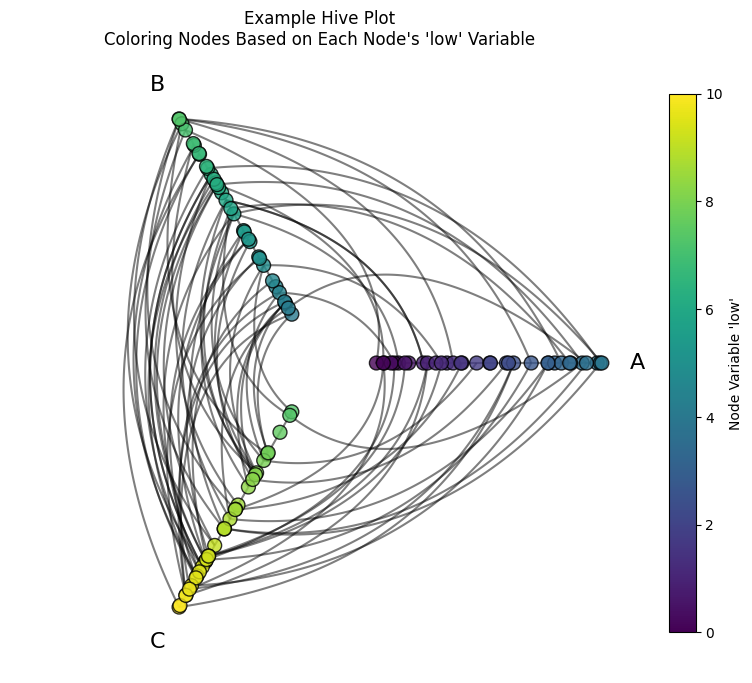
Before we discuss modifying how we sort nodes, let’s discuss why the above example has the color patterns from the placement of nodes on each axis.
First, let’s note the underlying node data for this example:
[3]:
hp.nodes.data
[3]:
| unique_id | low | med | high | partition_0 | |
|---|---|---|---|---|---|
| 0 | 0 | 6.363247 | 14.795079 | 23.193620 | B |
| 1 | 1 | 2.695169 | 12.321405 | 21.873202 | A |
| 2 | 2 | 0.409326 | 18.010787 | 26.718541 | A |
| 3 | 3 | 0.165111 | 19.226066 | 21.949123 | A |
| 4 | 4 | 8.124570 | 12.658641 | 25.771102 | C |
| ... | ... | ... | ... | ... | ... |
| 95 | 95 | 9.562530 | 15.708242 | 25.857141 | C |
| 96 | 96 | 1.486152 | 10.064025 | 21.225680 | A |
| 97 | 97 | 9.716562 | 17.718766 | 29.328351 | C |
| 98 | 98 | 8.890456 | 19.772874 | 26.833664 | C |
| 99 | 99 | 8.215515 | 15.892802 | 28.229576 | C |
100 rows × 5 columns
This hive plot both partitioned nodes onto the axes and sorted the nodes on each axis using the low variable.
(For more on the partition variable, see the Setting a Partition Variable page).
Note that on each axis, the node color values increase as we go from the lower / inner axis values to the higher / outer values. This is because we’re using the same color for nodes as the sorting variable of each axis:
[4]:
hp.sorting_variables
[4]:
{'A': 'low',
 'B': 'low',
 'C': 'low',
 'A_repeat': 'low',
 'B_repeat': 'low',
 'C_repeat': 'low'}
Set Sorting Variables on a New Hive Plot#
Instantiating a HivePlot requires:
Nodes
Edges
A node partition variable, and
A node sorting variable.
Let’s recreate the above HivePlot instance without calling example_hive_plot().
First, we will borrow the nodes and edges from the above example:
[5]:
nodes = hp.nodes.copy()
edges = hp.edges.copy()
We will also use the same partition variable (partition_0) used above.
[6]:
partition_variable = "partition_0"
Finally, for the sorting variable, we will be consistent with the above example, setting all the axis sorting variables to low. By supplying a node data column value to the sorting_variables parameter below, we will use the same sorting variable for all axes.
[7]:
sorting_variables = "low"
With those four inputs, we can instantiate a new HivePlot object with equivalent plotting results to the above example:
[8]:
new_hp = HivePlot(
    nodes=nodes,
    edges=edges,
    partition_variable=partition_variable,
    sorting_variables=sorting_variables,
)

# do equivalent plotting to above example
fig, ax = new_hp.plot(node_kwargs=node_kwargs)

ax.set_title(
    "Recreating Example Hive Plot",
    y=1.05,
)
plt.show()

Set Sorting Variables For All Axes on a New Hive Plot#
We can update any axis’ sorting variable with any column of ordinal data from the underlying NodeCollection.
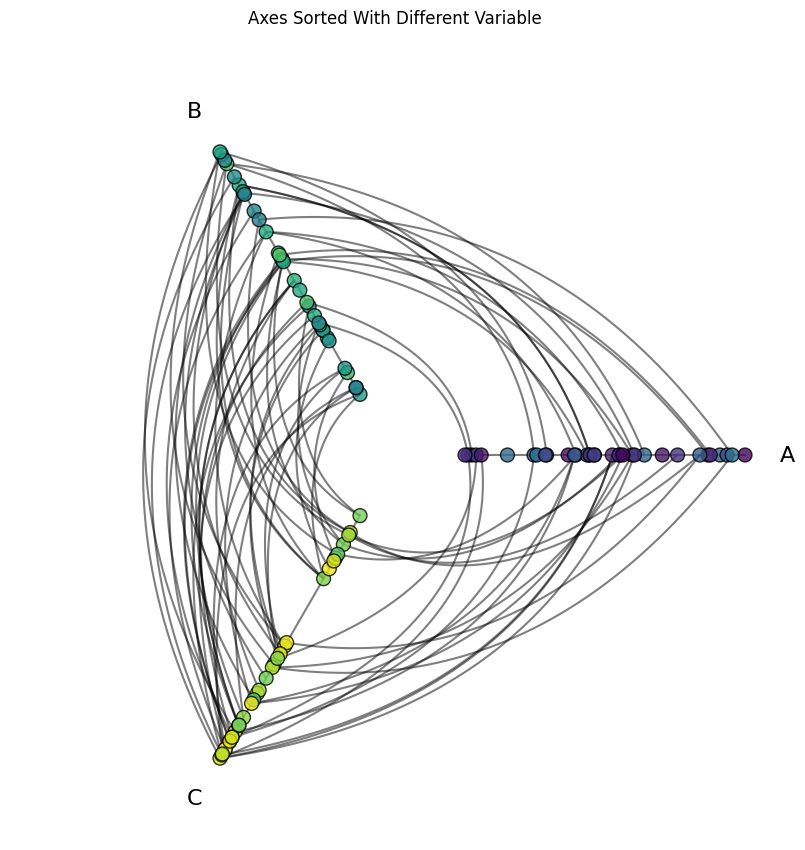
What would happen if we instead sorted the nodes on all the axes with the med column instead?
Note, there’s no releationship between the med values and the corresponding low values:
[9]:
fig, ax = plt.subplots()
ax.scatter(nodes.data.med, nodes.data.low)
ax.set_xlabel("Node 'med' Value")
ax.set_ylabel("Node 'low' Value")
ax.set_title("No relationship between node 'med' value and node 'low' value")
plt.show()

which means if we sort each axis with the value med, then the node colors on each axis should be distributed randomly along the length of the axis:
[10]:
med_sorted_hp = HivePlot(
    nodes=nodes,
    edges=edges,
    partition_variable=partition_variable,
    sorting_variables="med",  # switch all the axes to sorting with 'med'
)

fig, ax = med_sorted_hp.plot(node_kwargs=node_kwargs)

ax.set_title(
    "Axes Sorted With Different Variable",
    y=1.05,
)

plt.show()
Set Sorting Variables For Some Axes on a New Hive Plot#
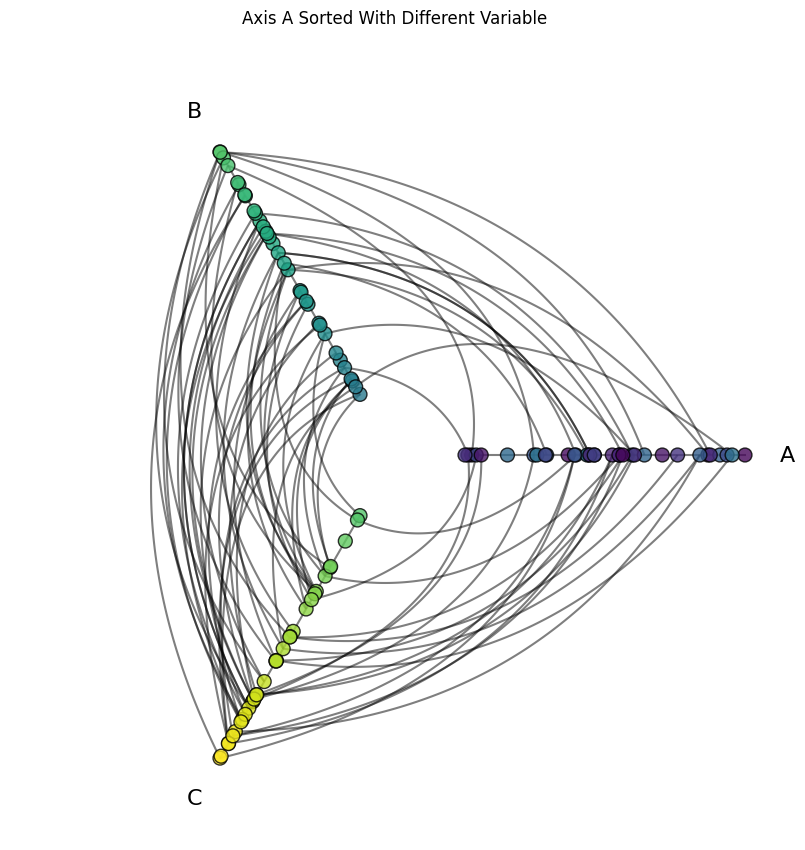
What would happen if we instead sorted only the nodes on Axis A with the med column? The node colors only on that axis should be distributed randomly along the length of the axis:
[11]:
different_axis_a_hp = HivePlot(
    nodes=nodes,
    edges=edges,
    partition_variable=partition_variable,
    sorting_variables={
        "A": "med",  # use different variable for axis A
        "B": "low",  # still need to specify the other axis sorting vars
        "C": "low",
    },
)

fig, ax = different_axis_a_hp.plot(node_kwargs=node_kwargs)

ax.set_title(
    "Axis A Sorted With Different Variable",
    y=1.05,
)

plt.show()
Set Sorting Variables on an Existing Hive Plot#
Users with lots of node variables will likely find themselves wanting to try multiple sorting variables on axes. This can easily be done using the HivePlot.update_sorting_variables() method on an existing hive plot.
Set Sorting Variables For All Axes on an Existing Hive Plot#
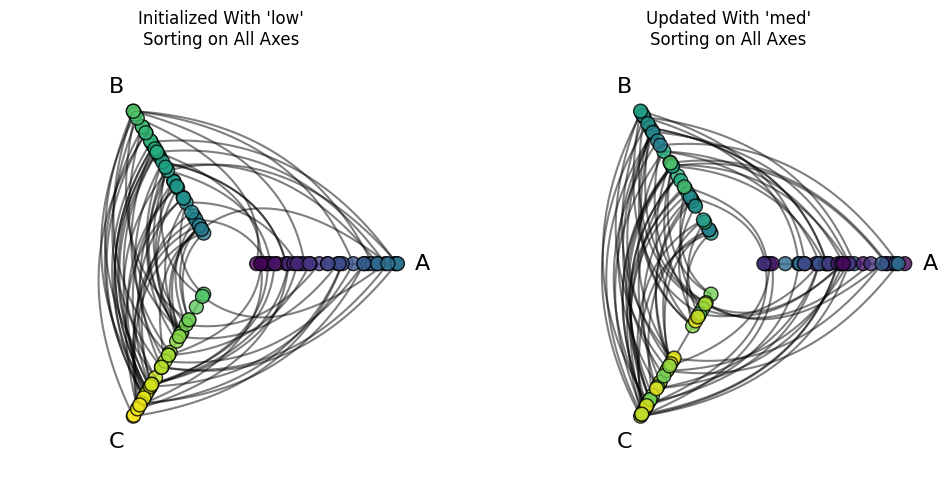
Suppose we want to try a different sorting variable for all of our axes. This can be done easily by calling the HivePlot.update_sorting_variables() method setting the sorting_variables parameter to a node column data value rather than specifying individual axes in a dictionary:
[12]:
fig, axes = plt.subplots(1, 2, figsize=(12, 6))

low_initialized_hp = HivePlot(
    nodes=nodes,
    edges=edges,
    partition_variable=partition_variable,
    sorting_variables="low",
)

low_initialized_hp.plot(
    buffer=0.2,
    node_kwargs=node_kwargs,
    fig=fig,
    ax=axes[0],
)

axes[0].set_title("Initialized With 'low'\nSorting on All Axes")

low_initialized_hp.update_sorting_variables(
    sorting_variables="med",  # update all axes to use 'med'
)

low_initialized_hp.plot(
    buffer=0.2,
    node_kwargs=node_kwargs,
    fig=fig,
    ax=axes[1],
)

axes[1].set_title("Updated With 'med'\nSorting on All Axes")

plt.show()
Set Sorting Variables For Some Axes on an Existing Hive Plot#
Suppose we want all axes to use the sorting variable low, except for Axis A, for which we want to use the sorting variable med. This can be done by instantiating the HivePlot with all axes using the sorting variable low, and then updating just Axis A to use the sorting variable med with the HivePlot.update_sorting_variables() method:
[13]:
fig, axes = plt.subplots(1, 2, figsize=(12, 6))

low_initialized_hp = HivePlot(
    nodes=nodes,
    edges=edges,
    partition_variable=partition_variable,
    sorting_variables="low",
)

low_initialized_hp.plot(
    buffer=0.2,
    node_kwargs=node_kwargs,
    fig=fig,
    ax=axes[0],
)

axes[0].set_title("Initialized With 'low'\nSorting on All Axes")

low_initialized_hp.update_sorting_variables(
    sorting_variables={"A": "med"},  # update just axis A to 'med'
)

low_initialized_hp.plot(
    buffer=0.2,
    node_kwargs=node_kwargs,
    fig=fig,
    ax=axes[1],
)

axes[1].set_title("Updated With 'med'\nJust for Axis A")

plt.show()
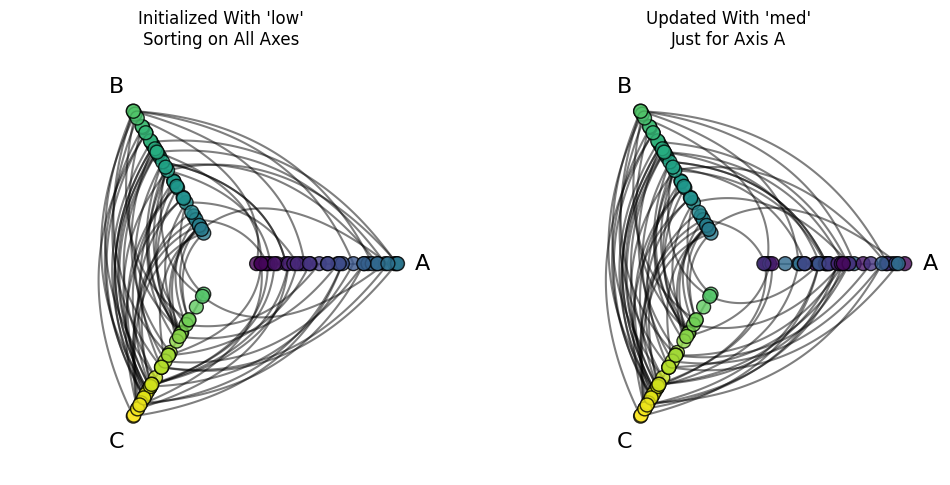
Note that this does not create a MissingSortingVariableError because axes B and C have their sorting variables from initialization (see next section).
As long as a
HivePlotinstance already has a sorting variable for each axis, then we can change subsets of axis sorting variables.
All Axes Must Have a Sorting Variable#
Note we have to specify all the axis sorting variables on instantiation of a HivePlot when providing a dictionary of sorting_variables. Otherwise, a MissingSortingVariableError error will be returned:
[14]:
import traceback

from hiveplotlib.exceptions import MissingSortingVariableError

try:
    HivePlot(
        nodes=nodes,
        edges=edges,
        partition_variable=partition_variable,
        sorting_variables={
            "A": "med",  # skips axes B and C
        },
    )
except MissingSortingVariableError:
    traceback.print_exc()
Traceback (most recent call last):
  File "/tmp/ipykernel_1962621/258808643.py", line 6, in <module>
    HivePlot(
  File "/home/garyk/repos/hiveplotlib/src/hiveplotlib/hiveplot.py", line 2295, in __init__
    self.set_partition(
  File "/home/garyk/repos/hiveplotlib/src/hiveplotlib/hiveplot.py", line 3047, in set_partition
    self.update_sorting_variables(
  File "/home/garyk/repos/hiveplotlib/src/hiveplotlib/hiveplot.py", line 2933, in update_sorting_variables
    raise MissingSortingVariableError(msg)
hiveplotlib.exceptions.hive_plot.MissingSortingVariableError: Provided `sorting_variables` axes ['A'] do not cover *all* the necessary axes specified by the current partition: (['C', 'A', 'B']).
The following axes specifications must be included: ['C', 'B']
The easier way to change a small subset of axis sorting variables is to update that subset of axes on an existing hive plot with the HivePlot.update_sorting_variables() method, discussed above.
Tracking the Current Sorting Variables#
To keep track of the sorting variables being used for each axis, we can always check the HivePlot.sorting_variables attribute.
For example, here are the sorting variables for a hive plot that defaults all axes to sort on low but updates the sorting variable of Axis A:
[15]:
low_initialized_hp = HivePlot(
    nodes=nodes,
    edges=edges,
    partition_variable=partition_variable,
    sorting_variables="low",
)

low_initialized_hp.update_sorting_variables(
    sorting_variables={"A": "med"},  # update just axis A to 'med'
)

low_initialized_hp.sorting_variables
[15]:
{'A': 'med',
 'B': 'low',
 'C': 'low',
 'A_repeat': 'low',
 'B_repeat': 'low',
 'C_repeat': 'low'}
Note that by default, the initialization filled in the sorting variables for repeat axes as well. For more on repeat axes, see the Adding and Modifying Repeat Axes page.
Using Node Graph Metrics as Sorting Variables#
Node graph metrics can also be used as sorting variables for network data. Hiveplotlib can compute these for us on HivePlot initialization via the node_graph_metrics parameter. For more on Hiveplotlib-supported graph metrics, see the Computing Graph Metrics page.